Does Microsoft Outlook Have a Backup Feature?
Microsoft Outlook does not offer a dedicated “one-click backup” feature like some modern cloud-based services. However, it does allow users to manually back up their data using PST (Personal Storage Table) files.
This means you can create a backup of your emails, contacts, calendars, and other mailbox items—but the process requires manual effort.
How to Backup Outlook Data Manually?
Method 1: Export to PST File
Outlook allows you to export your entire mailbox into a PST file, which acts as a backup.
Steps:
- Open Microsoft Outlook
- Click on File

- Select Open & Export and Click Import/Export

- Choose Export to a file
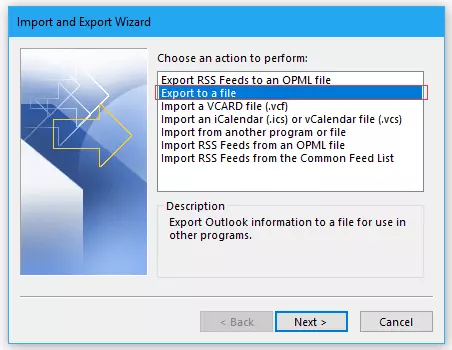
- Select Outlook Data File (.pst)
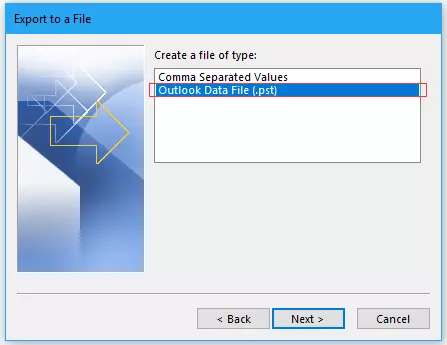
- Choose folders to export

- Save the file to your system and click Finish

This PST file can later be imported back into Microsoft Outlook whenever needed.
Method 2: Auto-Archive Feature
Outlook also provides an Auto-Archive option that automatically moves old emails to a PST file at regular intervals. While this is not a full backup solution, it helps in managing and preserving older data.
Limitations of Outlook Backup Methods
Although Outlook provides manual backup options, they come with certain drawbacks:
- No automatic or scheduled full backup system
- Requires technical steps and user involvement
- Risk of missing important data if not done properly
- PST files can become large and difficult to manage
- No direct support for backing up to cloud platforms
Why Users Look for Better Backup Solutions
Because of these limitations, many users prefer using tools from the best email solution company to simplify the backup process. These solutions are designed to provide automated, secure, and flexible backup options.
Best Email Solution Company for Outlook Backup
There are many tools that make Outlook backup much easier and more efficient. These tools go beyond manual PST export and offer advanced features. One such tool is the Advik PST File Converter Tool provide:
- One-click backup of Outlook emails
- Option to save data in multiple formats (PST, PDF, EML, MBOX, etc.)
- Direct backup to cloud platforms and webmail accounts
- Incremental backup to avoid duplication
- Easy-to-use interface for non-technical users
Such tools are ideal for both individuals and businesses who want a reliable and automated backup system without complications.
Conclusion
While Microsoft Outlook does offer a way to back up data through PST files and auto-archive, it lacks a fully automated backup feature. For users who need more convenience, security, and flexibility, choosing a solution from the best email solution company is often the better approach.
Understanding these options helps you protect your valuable email data and ensures you’re always prepared for unexpected data loss.
 English
 Arabic
 French
 Spanish
 Portuguese
 Deutsch
 Turkish
 Dutch
Dutch
 Italiano
 Russian
 Romaian
 Portuguese (Brazil)
 Greek
Greek




