
DevSecOps Consulting Services for Secure Code with SonarQube
DevSecOps Essentials: Mitigating Early-Stage Vulnerabilities with SonarQube and OWASP Dependency-Check

In the ever-evolving world of the internet, effective vulnerability management has become a critical component of the DevSecOps process. As developers strive to create secure applications, it’s essential to integrate software security tools that can identify vulnerabilities and Common Vulnerabilities and Exposures (CVEs) throughout the development lifecycle.
In this article, we will explore various open-source tools, such as SonarQube security and OWASP Dependency-Check, that can be seamlessly integrated at different stages of the development process to enhance code security, specifically focusing on Java applications.
What is Vulnerability?
A vulnerability refers to a weakness in a developed system that can lead to system failure, operational disruptions, data theft, security compromises, data leaks, or breaches. Addressing vulnerabilities is crucial to ensuring the safety and reliability of software systems.
Below are some key factors that can introduce vulnerabilities into your software:
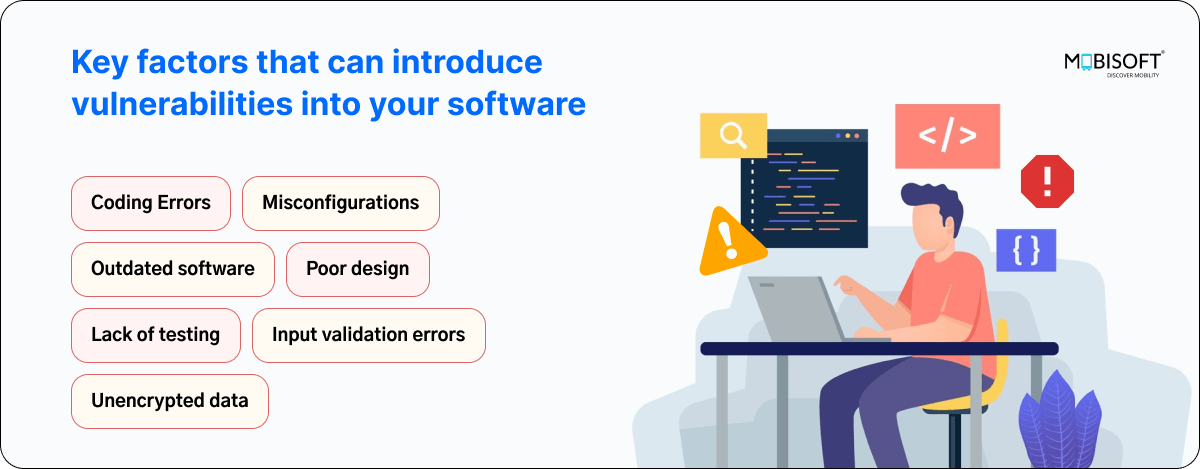
Various tools are available in the market for identifying vulnerabilities and CVEs, but SonarQube security and OWASP Dependency-Check stand out as essential resources for securing applications. These tools can be seamlessly integrated into your development workflow, enhancing your vulnerability management strategy.

Prerequisites:
-
Ubuntu <latest version >
-
Install applications ( Java, maven)
-
Java Project
-
Sonar server ( Hosted )
-
Sonar login credentials

1. SonarScanner:
-
This tool is used to assess code quality. It analyzes the code and generates a report based on its findings.
-
By integrating seamlessly with your CI pipeline or supported DevOps platforms, it evaluates your code against a comprehensive set of rules. These rules address key attributes such as maintainability, reliability, and security, ensuring thorough analysis for every merge or pull request.
Scanning Capabilities
-
Static Code Analysis: Examines source code without execution to identify potential errors and inefficient coding practices.
-
Security Analysis: Detects security vulnerabilities such as SQL injection, cross-site scripting (XSS), and buffer overflow risks.
-
Concurrency Error Detection: Identifies runtime defects like race conditions, exceptions, resource and memory leaks, and security vulnerabilities.
-
Performance Analysis: Monitors software applications during runtime to diagnose and resolve performance bottlenecks.
-
Report Generation: Offers comprehensive reporting features to evaluate code quality and effectively identify issues.

How can we integrate it in Java?
From the local machine
Installation Process for SonarScanner
Install sonar scanner in your machine if not already installed
Step 1: Visit the official SonarSource website to find the latest version of the SonarScanner CLI. Look for the download link for the zip file.
⇒ wget https://binaries.sonarsource.com/Distribution/sonar-scanner-cli/sonar-scanner-cli-4.2.0.1873-linux.zip
⇒ unzip sonar-scanner-cli-4.2.0.1873-linux.zip

Step 2: To set environment variables for accessing the SonarQube portal from your local machine, execute below commands:
⇒ sudo mv sonar-scanner-4.2.0.1873-linux/ /opt/
⇒ sudo nano /opt/sonar-scanner-4.2.0.1873-linux/conf/sonar-scanner.properties
Add below content in sonar-scanner.properties
sonar.host.url=<your hosted domain for sonar server>
sonar.login=user.name
sonar.password=*****passwd****

Step 3: To set up a profile on your local machine for accessing SonarQube we need to add sonarpath in sonar-scanner.sh file, for this, execute the below commands
⇒ sudo nano /etc/profile.d/sonar-scanner.sh
##Add path in sonar-scanner.sh file and save the file :
export PATH=”/opt/sonar-scanner-4.2.0.1873-linux/bin:$PATH”
Step 4: To apply the changes you've made, execute the following command:
⇒ source /etc/profile.d/sonar-scanner.sh
Step 5: To verify Installation of the sonar scanner is completed check the version of it.
⇒ sonar-scanner --version
Step 6: Configure SonarScanner CLI:
-
To connect SonarScanner CLI to your SonarQube server or SonarCloud, you need to create and configure a sonar-scanner.properties file in your project root directory.
-
Open the sonar-scanner.properties file in a text editor and configure it according to your project requirements. Below is an example configuration:
sonar-scanner.properties
# must be unique in a given SonarQube instance(project_key)
sonar.projectKey=<your_project_key>
# This is the name and version displayed in the SonarQube UI. Was mandatory prior to SonarQube 6.1.
sonar.projectName=<your_project_name>
sonar.projectVersion=0.0.1
# Path is relative to the sonar-project.properties file. Replace "\" by "/" on Windows.
# If not set, SonarQube starts looking for source code from the directory containing
# the sonar-project.properties file.
sonar.sources=src/main/java
sonar.projectBaseDir=.
# Encoding of the source code. Default is default system encoding
sonar.sourceEncoding=UTF-8
sonar.binaries=target/classes/
sonar.java.binaries=target/classes/
Step 7: Run SonarScanner CLI
Navigate to your project directory in the Terminal and execute the following command to run SonarScanner CLI:
⇒ sonar-scanner
How can we integrate it into the CICD pipeline?
-
To integrate SonarScanner into your CI/CD pipeline, you can create a script that executes SonarScanner commands before building your project.
-
In the below script, we are using the Maven plugin; if you want to use sonar-scanner CLI, follow the installation instructions and provide the command in the script in place of Maven.
Read more: DevSecOps Consulting Services for Secure Code with SonarQube

 English
 Arabic
 French
 Spanish
 Portuguese
 Deutsch
 Turkish
 Dutch
Dutch
 Italiano
 Romaian
 Portuguese (Brazil)
 Greek
Greek