


Boost Your Angular App Speed with Expert Web Application Development Services

Have you ever built a dashboard that feels slow or unresponsive right after loading? Or a page that tries to load everything at once, even parts the user hasn’t even scrolled to yet? As Angular apps grow, so does the initial rendering cost, which can make the app feel sluggish. While Angular has always offered tools like *ngIf for conditionally showing content and Angular lazy-loaded modules to split up large apps, these tools haven't made it easy to control conditional rendering in smaller, more specific parts of a page.
You might wonder: why render things no one’s even looking at yet? Why not save those precious CPU cycles for something more important? Enter Angular @defer, our performance hero, swooping in to slash initial load times and bring some sanity back to your rendering logic
What is @defer?
Starting with Angular 17, you can now use @defer syntax in Angular to delay rendering certain parts of your templates. This new feature, called deferred views in Angular, gives you a simple and powerful way to control when specific parts of the UI should appear. Whether it's waiting for user interaction, scrolling to a section, or even waiting for a certain condition to be met, @defer helps you load only what's needed, when it's needed. This can greatly improve both actual performance and how fast the app feels to users, all without adding much complexity for developers. Many companies looking to hire angular developers are now using these strategies to build high-performing web apps
The @defer block is a structural syntax that tells Angular, "Wait to render this part of the view until certain conditions are met." It's more than just Angular lazy loading. It's an intelligent, conditional rendering technique that supports Angular template optimization.
@defer {

  <app-heavy-widget />

 }
In the example above, <app-heavy-widget> won't be created immediately with the rest of the page. Instead, Angular will defer its rendering, resulting in a faster, lighter initial page load.
This aligns with Angular rendering strategies aimed at improving performance and user experience. It’s a common approach in modern web application development, where performance-driven conditional rendering is critical for scalable UI solutions.

Which Dependencies Can Be Deferred?
For anything inside a @defer block to be truly lazy-loaded, these two rules apply:
- They must be standalone components. If a dependency isn’t standalone, it will still load eagerly, even if it's inside a @defer block.
- They shouldn’t be used elsewhere in the same file. If a component, directive, or pipe is referenced outside the @defer block (like with ViewChild), it can't be deferred.
The good news? Their inner dependencies (transitive ones) can still be a mix of standalone or NgModule-based and will be deferred along with them, making Angular bundle splitting more efficient.
Built-In Triggers: When Does It Load?
Angular hands you the remote. You decide exactly when a deferred view in Angular should come to life. Whether it's user interaction, viewport visibility, or custom conditions, you've got fine-grained control at your fingertips.
- when <condition>
@defer (when isDataLoaded) {

  <app-user-profile />

}
Renders only when isDataLoaded becomes true or any other condition you choose to define. This supports deferred loading in Angular applications where rendering is tied to reactive states.
- when idle
@defer (when idle) {

  <app-analytics-widget />

}
Perfect for non-critical widgets that can wait their turn, rendered when the browser is idle and free from heavy operations. This is useful for improving core web vitals in Angular apps.
- on timer(<ms>)
@defer (on timer(3000)) {

  <app-product-ad />

}
Renders after a 3-second delay. Great for popups, ads or content below-the-fold.
- when visible
@defer (when visible) {

  <app-footer />

}
Uses Intersection Observer to defer rendering until the element scrolls into view.
Enhancing UX: Placeholders, Loading & Error States
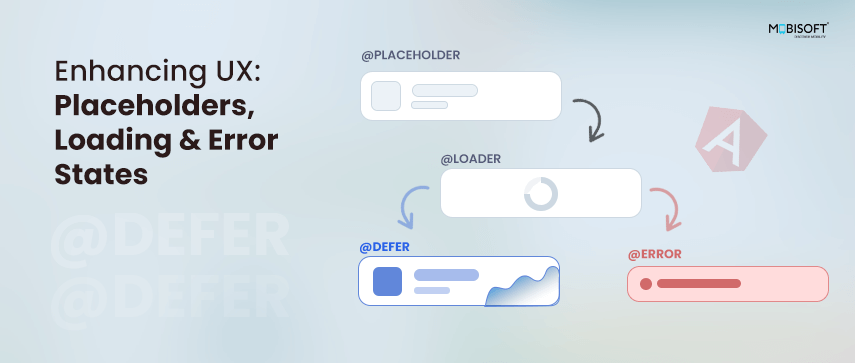
Deferred views in Angular aren’t just about performance,they’re also a big win for user experience. Without proper feedback, delayed content can leave users confused, staring at a blank space with no idea what's happening. That’s where sub-blocks like Angular @placeholder block, @loading block, and @error block come to the rescue to improve Angular template optimization.
What Could Go Wrong Without Them?
- Empty Gaps: If a deferred component is loading but there’s no visual cue, users may think the app is broken or unresponsive.
- Uncertainty: A delay without feedback can make users second-guess their actions: Did I click that button? Is the page stuck?
- Poor Accessibility: Screen readers may have nothing to announce, making the experience confusing for assistive technologies.
- Debugging Pain: If something silently fails, users and even developers might miss it entirely.
How Placeholders & States Help
Placeholder
@placeholder lets you show temporary content while the real component is being loaded. This can be a spinner, image, skeleton UI, or anything that makes the wait feel intentional and expected. The @placeholder block also lets you set a minimum time it should stay visible, using the minimum parameter (like 500ms or 2s). This helps prevent a flicker effect when the deferred content loads too quickly. The timer starts right after the placeholder finishes rendering.
For example:
@defer {

<app-heavy-widget />

} @placeholder (minimum 1s) {

<div>Loading...</div>

}
Even if the widget loads instantly, the placeholder will stay for at least 1 second to keep the UI smooth and contribute to angular performance optimization.
Loading
@loading provides a hook for when the defer block has started fetching but isn’t ready yet. This is especially helpful for async operations like Angular lazy loading of modules or data. The @loading block also accepts two optional parameters to specify the minimum amount of time that this placeholder should be shown and the amount of time to wait after loading begins before showing the loading template. The purpose of these params is the same as placeholders, to prevent flicker effects. Both the minimum and after timers for the @loading block begin immediately after the loading has been triggered.
Error
@error gives you a graceful fallback if the deferred component fails to load, whether due to a network issue, module resolution error, or some other problem. This enhances core web vitals in Angular by preventing bad user experiences due to invisible failures.
@defer (on timer(2s)) {

<app-heavy-widget />

} @placeholder {

<div class="skeleton">Loading widget...</div>

} @loading {

<div class="spinner">Almost there...</div>

} @error {

<div class="error">Oops! Couldn’t load the widget.</div>

}
With these features in place, your app stays informative, accessible, and polished, even when deferring content behind the scenes. This supports both UX and deferred loading in Angular.

 English
 Arabic
 French
 Spanish
 Portuguese
 Deutsch
 Turkish
 Dutch
Dutch
 Russian
 Romaian
 Portuguese (Brazil)
 Greek
Greek